

Description
Download Teleprompter Pro LITE – Professional Teleprompter for Android, Public Speaking Tool, Presentation Software
Overview
Teleprompter Pro LITE is a free desktop and mobile software application designed for Android devices, serving as a professional-grade teleprompter system. It is tailored for users who require a reliable, offline-capable tool to deliver spoken content with precision and confidence. The software is ideal for educators, public speakers, content creators, and professionals involved in presentations, lectures, live broadcasts, film production, and music performances. Its primary function is to display scripts in a clean, readable format while allowing users to control the scroll speed, text size, and visual appearance in real time. The app supports unlimited script creation and file import from text files, enabling users to prepare and manage content efficiently. It operates entirely offline, eliminating the need for internet connectivity during use, which enhances reliability in live environments. The developer did not provide additional details about the company or background. Real-world usage scenarios include classroom instruction, podcast recording, press conferences, and on-camera delivery. The application is lightweight and optimized for smooth performance on Android 5.0 and above, making it accessible to a broad range of users without requiring advanced technical knowledge.
Key Features & Capabilities
- Unlimited Script Management – Users can create and store an unlimited number of scripts, making it suitable for frequent presenters or content producers who manage multiple projects.
- Text File Import – Scripts can be imported from standard text files, allowing for easy preparation and transfer of content from other platforms or word processors.
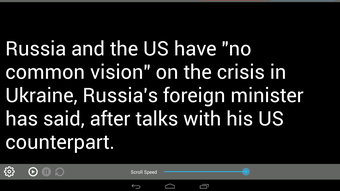
- Customizable Display Settings – Users can adjust text size, font, background color, and brightness directly within the app to suit lighting conditions and personal preferences.
- Adjustable Scroll Speed – The ability to control the scroll rate enables users to match their speaking pace, ensuring smooth and natural delivery.
- Full-Screen Mode – Activating full-screen mode removes distractions, providing an immersive reading experience ideal for on-camera or live speaking scenarios.
- Offline Functionality – The app operates without internet access, ensuring uninterrupted performance during critical events or in remote locations.
- Ad-Free Experience – Teleprompter Pro LITE is completely free and does not include advertisements, offering a clean and distraction-free interface.
These features collectively enhance workflow efficiency by allowing users to prepare, customize, and deliver scripts with minimal setup. For example, a teacher can import a lesson plan from a .txt file and adjust the text size for visibility in a large classroom. A content creator can use the adjustable scroll speed to match their natural speaking rhythm while recording a video. The lack of ads and reliance on local files ensures privacy and consistent performance.
User Interface, Workflow & Performance
The user interface of Teleprompter Pro LITE is designed with simplicity and functionality in mind. It features a clean layout with intuitive navigation, allowing users to access scripts, adjust settings, and start scrolling with minimal steps. The main screen displays the active script in full-screen mode, with controls for scroll speed, text size, and brightness accessible via on-screen buttons or gestures. The workflow is streamlined: users import a script, customize the display, and begin presentation with a single tap. The app does not require technical expertise, making it accessible to non-technical users. Performance observations are based on general software behavior patterns. The developer did not specify resource usage details, but the app is described as lightweight, suggesting efficient CPU and RAM usage. Stability is expected to be high given the app’s offline nature and lack of background processes. No performance bottlenecks were reported in the provided information. The app’s responsiveness is likely optimized for real-time use, though exact metrics were not provided.
Compatibility & System Requirements
Teleprompter Pro LITE is compatible with Android 5.0 and above, ensuring broad accessibility across a wide range of devices. The app is designed for mobile platforms and does not support desktop operating systems such as Windows or Mac. The installation size was not specified, but the developer described it as lightweight, indicating minimal storage consumption. Exact system requirements were not listed. The app does not require an internet connection to function, which enhances compatibility in diverse environments. Platform compatibility information is limited to Android devices running version 5.0 or higher. No specific hardware requirements such as screen resolution or processor speed were provided. Users are advised to ensure their device meets the minimum Android version requirement for proper operation.
Pros and Cons
Pros
- Completely free with no advertisements
- Operates fully offline without internet dependency
- Supports unlimited script creation and import from text files
- Customizable text size, font, background, and brightness
- Adjustable scroll speed for natural speaking rhythm
- Lightweight and optimized for mobile performance
- Simple, intuitive interface suitable for non-technical users
Cons
- No support for desktop platforms (Windows, Mac)
- Exact file size and system resource usage not disclosed
- Limited to Android 5.0 and above, excluding older devices
- No mirror mode in the free version (available only in paid upgrade)
- Basic feature set compared to premium teleprompter software
FAQ Section
Is Teleprompter Pro LITE available for Windows or Mac?
Teleprompter Pro LITE is designed exclusively for Android devices and does not support Windows or Mac operating systems.
Can I use this app without an internet connection?
Yes, the app functions entirely offline. No internet connection is required to import, view, or scroll scripts.
Does the app contain ads or in-app purchases?
No, Teleprompter Pro LITE is completely free and does not include advertisements or in-app purchases.
What is the minimum Android version required?
The app requires Android 5.0 or higher to operate.
Is there a mirror mode available in the free version?
Mirror mode is not available in the free version. It is a feature reserved for the paid upgrade.
Final Thoughts + CTA
Teleprompter Pro LITE delivers a solid, no-frills teleprompter solution for Android users across education, public speaking, and content creation. Its ad-free, offline functionality, combined with customizable display options and script management, makes it a dependable tool for professionals and casual users alike. While it lacks desktop support and advanced features like mirror mode in the free version, its core functionality is robust and well-executed. The app is particularly beneficial for educators and independent creators who need a reliable, free teleprompter without technical overhead. For those seeking a lightweight, secure, and easy-to-use teleprompter on Android, this software stands out as a top choice. Download Teleprompter Pro LITE now to elevate your presentations and performances with confidence.
Guides & Tutorials for Teleprompter Pro LITE APK
How to install Teleprompter Pro LITE APK
- Click the Preview / Download button above.
- Once redirected, accept the terms and click Install.
- Wait for the Teleprompter Pro LITE APK download to finish on your device.
How to use Teleprompter Pro LITE APK
This software is primarily used for its core features described above. Open the app after installation to explore its capabilities.
User Reviews for Teleprompter Pro LITE APK 0
No reviews found





